Expressions
Radiate includes a composable expression system that lets you query and transform the engine's metric state at runtime. Expressions are stateful, lazily-evaluated trees — each call to .apply() or an internal engine dispatch consumes one "tick" of any stateful nodes (rolling windows, schedules, etc.). This system was designed to be extremely similar to polars' expression API to leverage the same mental model of lazy evaluation and chaining, but adapted to radiate's needs.
Expressions are used in three places within the engine:
- Termination conditions — stop evolution when an expression evaluates to
true - Derived metrics — register expressions that run every generation and write their output back into the
MetricSet - Dynamic rates — drive alterer rates from metric values rather than a fixed schedule
Building Expressions
The expression DSL is available directly from the radiate package:
Aggregations
Expressions can aggregate over accumulated history using a rolling window or directly over a collection.
import radiate as rd

score = rd.Expr.select("scores.best")

score.last()  # last recorded value (default)
score.mean()  # running mean of all values seen
score.stddev()  # standard deviation
score.min()  # running minimum
score.max()  # running maximum
score.sum()  # running sum
score.var()  # variance
score.skew()  # skewness
score.count()  # number of values seen
score.slope()  # linear slope over accumulated values
score.unique()  # deduplicated collection

# Rolling window: aggregate over the last N values only
score.rolling(50).mean()  # mean of the last 50 values
score.rolling(50).stddev()  # std dev of the last 50
score.rolling(100).slope()  # slope over a 100-generation window
let score = Expr::select("scores.best");

score.clone().last(); // last recorded value (default)
score.clone().mean(); // running mean
score.clone().stddev(); // standard deviation
score.clone().min(); // running minimum
score.clone().max(); // running maximum
score.clone().sum(); // running sum
score.clone().var(); // variance
score.clone().skew(); // skewness
score.clone().count(); // number of values seen
score.clone().slope(); // linear slope over all accumulated values
score.clone().unique(); // deduplicated collection

// Rolling window: aggregate over the last N values only
score.clone().rolling(50).mean();
score.clone().rolling(100).slope();
Comparisons and Logic
Expressions support standard comparison and boolean operators. These always produce a Bool result.
Python operator overloads are supported, so you can write expressions naturally:
import radiate as rd

score = rd.Expr.select("scores.best")

# Comparisons — Python operators work directly. Each produces a Bool expression.
below = score < 0.01
at_most = score <= 0.01
above = score > 0.99
at_least = score >= 0.99
equal = score == 0.5
not_equal = score != 0.5

# Boolean logic combines Bool expressions
both = (score < 0.01) & (rd.Expr.select("index") > 50)  # and
either = (score < 0.01) | (rd.Expr.select("time") > 10.0)  # or
negated = ~(score < 0.01)  # not

# A range check is just two comparisons (an inclusive "between")
in_range = (score >= 0.0) & (score <= 1.0)
let score = Expr::select("scores.best");
let index = Expr::select("index");

score.clone().lt(0.01_f32);
score.clone().lte(0.01_f32);
score.clone().gt(0.99_f32);
score.clone().gte(0.99_f32);
score.clone().eq(0.5_f32);
score.clone().ne(0.5_f32);

// Boolean logic
score.clone().lt(0.01_f32).and(index.clone().gt(50.0_f32)); // and
score.clone().lt(0.01_f32).or(index.clone().gt(500.0_f32)); // or
score.clone().lt(0.01_f32).not(); // not

// Convenience: between (inclusive)
score.clone().between(0.0_f32, 1.0_f32);
Arithmetic
Python arithmetic operators are supported:
let a = Expr::select("scores.best");
let b = Expr::select("score.volatility");

a.clone().add(b.clone());
a.clone().sub(b.clone());
a.clone().mul(Expr::lit(2.0_f32));
a.clone().div(b.clone());
a.clone().pow(Expr::lit(2.0_f32));
a.clone().neg();
a.clone().abs();
a.clone().clamp(Expr::lit(0.0_f32), Expr::lit(1.0_f32));
Conditional Expressions
when / then / otherwise composes a ternary branch. Both branches must be Expr values.
Schedule: every
every(n) fires true once every n calls and false otherwise. It is purely stateful — it ignores its input entirely. Combined with when / then / otherwise, it produces an expression that returns different values at different cadences.
Querying Metrics
Expressions are evaluated against the engine's MetricSet. Meaning any metric inside the metric set can be selected and transformed with expressions. The most commonly used metrics are documented in the Metrics reference, but you can also select any custom metric you've registered via register_metrics or that the engine produces internally.
Additional metrics are available when the engine is configured for species-based diversity (species.count, species.age, etc.) or multi-objective optimization (front.size, front.entropy, etc.).
By default expr::select("metric_name") reads last_value. To interpret the value as a duration, chain .time() before the aggregation:
Integration:
1: Expression Limits
An Expr that returns a bool can be used as a termination condition. The engine stops as soon as the expression evaluates to true.
import radiate as rd

engine = rd.Engine.float(10, init_range=(-5.0, 5.0)).fitness(my_fitness_fn).minimizing()

# Stop when the best score has been below 0.01 on average over the last 50 generations
stop_expr = rd.Expr.select("scores.best").rolling(50).mean() < 0.01

result = engine.limit(rd.Limit.expr(stop_expr)).run()
You can also combine an expression limit with other limits:
let engine = GeneticEngine::builder()
    .codec(FloatCodec::vector(10, -5.0..5.0))
    .minimizing()
    .fitness_fn(my_fitness_fn)
    .build();

// Stop when the rolling mean of the best score drops below 0.01
let stop_expr = Expr::select("scores.best").rolling(50).mean().lt(0.01_f32);

let result = engine
    .iter()
    .limit((
        Limit::Expr(stop_expr),
        Limit::Generation(5000), // hard ceiling
    ))
    .last()
    .unwrap();
2: Derived Metrics
You can register named expressions that are evaluated against the MetricSet at the end of every generation. Their output is written back as new metrics (tagged Expr), making them available to downstream expressions, limits, events, and the dashboard. This means you can create your own metrics!
Pass kwargs to .metrics() on the engine builder:
import radiate as rd

score_trend = rd.Expr.select("scores.best").rolling(20).slope().debug()
score_cv = (
    rd.Expr.select("scores.best").rolling(20).stddev()
    / rd.Expr.select("scores.best").rolling(20).mean()
)

engine = (
    rd.Engine.float(10, init_range=(-5.0, 5.0))
    .fitness(my_fitness_fn)
    .minimizing()
    .metrics(
        score_trend=score_trend,
        score_cv=score_cv,
    )
    .limit(rd.Limit.generations(500))
)

# These metrics are now available in every generation result
result = engine.run()
metrics = result.metrics
print(metrics["score_trend"].value_last())
print(metrics["score_cv"].value_last())
Derived metrics can also reference each other, as long as the referenced metric was registered first. They can also be used directly in a Limit.expr:
# Register a trend metric, then stop when it flattens
engine = (
    rd.Engine.float(10, init_range=(-5.0, 5.0))
    .fitness(my_fitness_fn)
    .minimizing()
    .metrics(score_trend=rd.Expr.select("scores.best").rolling(50).slope())
    .limit(
        rd.Limit.expr(abs(rd.Expr.select("score_trend")) < 0.0001),
        rd.Limit.generations(5000),
    )
)

result = engine.run()
Pass a Vec<impl Into<NamedExpr>> to .register_metrics() on the builder:
let score_trend = Expr::select("scores.best").rolling(20).slope();
let score_cv = Expr::select("scores.best")
    .rolling(20)
    .stddev()
    .div(Expr::select("scores.best").rolling(20).mean());

let engine = GeneticEngine::builder()
    .codec(FloatCodec::vector(10, -5.0..5.0))
    .minimizing()
    .fitness_fn(my_fitness_fn)
    .metrics([score_trend.alias("score_trend"), score_cv.alias("score_cv")])
    .build();

let result = engine.iter().limit(5000).last().unwrap();
let metrics = result.metrics();

// Access the derived metric values
if let Some(m) = metrics.get("score_trend") {
    println!("score_trend: {}", m.last_value());
}
Derived metrics can also feed expression limits:
let engine = GeneticEngine::builder()
    .codec(FloatCodec::vector(10, -5.0..5.0))
    .minimizing()
    .fitness_fn(my_fitness_fn)
    .metrics(
        Expr::select("scores.best")
            .rolling(50)
            .slope()
            .alias("score_trend"),
    )
    .build();

let result = engine
    .iter()
    .limit((
        Limit::Expr(Expr::select("score_trend").abs().lt(0.0001_f32)),
        Limit::Generation(5000),
    ))
    .last()
    .unwrap();
3: Dynamic Rates
An expression can also drive an alterer's rate, a species threshold, or any other rate-typed parameter. The expression is evaluated against the MetricSet each generation, and the result is used as the rate for that step. See Rates for the full set of recipes.
Pass the Expr directly wherever a rate is accepted:
import radiate as rd

# Start aggressive, decay as volatility drops
dynamic_rate = rd.Expr.select("score.volatility").rolling(20).mean().clamp(0.01, 0.5)

engine = (
    rd.Engine.float(10, init_range=(-5.0, 5.0))
    .fitness(my_fitness_fn)
    .minimizing()
    .alter(
        rd.Mutate.gaussian(rate=dynamic_rate),
        rd.Cross.blend(rate=0.5),
    )
)
Pass the Expr directly wherever a rate is accepted:
let dynamic_rate = Expr::select("score.volatility")
    .rolling(20)
    .mean()
    .clamp(0.01_f32, 0.5_f32);

let engine = GeneticEngine::builder()
    .codec(FloatCodec::vector(10, -5.0..5.0))
    .minimizing()
    .fitness_fn(my_fitness_fn)
    .alter(alters![
        GaussianMutator::new(dynamic_rate),
        BlendCrossover::new(0.5, 0.5),
    ])
    .build();
Example
So, what does all this do in practice? Well, let's say you opt-in to using speciation and as you test, you discover that ideally, your problem gets solved best with ~4 species. Well, speciation can jump around quite a bit sometimes and if we know that 4 is ideal, it would make sense that we want to maintain around 4 species consistently. Now, radiate does offer a target_species parameter out of the box, but lets pretend it didnt. Using expressions you can build a dynamic rate (threshold in this case) that encourages the engine to maintain that number of species. Lets see what it would look like to build a dynamic species threshold, we'll build the exact same feedback loop that radiate uses for it's target_species internally.
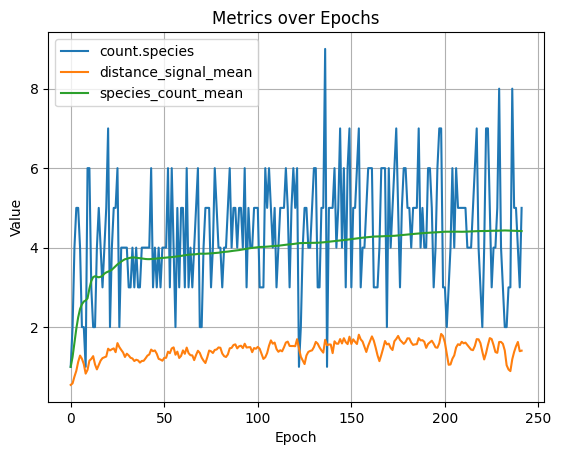
Then, using radiate's built-in MetricCollector subscriber, we plot those metrics over time to see how our registered distance signal correlates with species count and overall diversity.
import radiate as rd

rd.random.seed(90)

# Define a few parameters we'll need
# 1. Define the target number of species we want (4)
target_species = 4
# 2. Define a few constants for scaling the signals - remember this is a feedback loop
KP = 0.05  # Proportional gain
KI = 0.005  # Integral gain
KD = 0.02  # Derivative gain
# 3. Define an initial threshold value that we will start at
initial_threshold = 0.5

# Now, lets build our expression
# 1. We want an error signal to say how far we are from our desired target
raw_error = rd.Expr.select("species.count").error(target_species)
# 2. Now we need a proportional signal based on the raw error, smoothed by the proportional gain
proportional = (
    rd.Expr.select("species.count").rolling(3).mean().error(target_species) * KP
)

# 3. Next, we need to define our integral and derivative signals for the PID controller
# Integral: accumulated recent error over a rolling window
# Derivative: velocity of the error — anticipates rising/falling count
integral = raw_error.rolling(20).sum() * KI
derivative = raw_error.rolling(5).slope() * KD

# 4. Finally, combine the proportional, integral, and derivative signals to form the PID control signal.
# However, we need to make sure that the engine _has_ values in it's metric set to use (again, this is a feedback loop),
# so we want to wait at least one generation before our PID control signal is applied
pid_control_signal = (
    rd.Expr.when(rd.Expr.select("index") < 2)
    .then(initial_threshold)  # Use the initial threshold for the first generation
    .otherwise(
        rd.Expr.select("Our.PID") + proportional + integral + derivative
    )  # Notice the feedback! (the PID control signal depends on its own previous value)
    .clamp(0.0, target_species * 2.5)
    .alias("Our.PID")  # Give our PID control signal a name in the metric set
)

# Track a rolling 25 generation mean of the species count so we can plot it against the raw count
species_count_mean = rd.Expr.select("species.count").rolling(25).mean()

collector = rd.MetricCollector()

# Now, lets plug in our PID control signal into the engine's species threshold!
engine = (
    rd.Engine.graph(
        shape=(1, 1),
        vertex=[rd.Op.sub(), rd.Op.mul(), rd.Op.sum()],
        edge=rd.Op.weight(),
        output=rd.Op.sum(),
    )
    .regression(inputs, answers, loss=rd.MSE)
    .subscribe(collector)
    .diversity(rd.Dist.neat(1.0, 1.0, 3.0), threshold=pid_control_signal)
    .metrics(species_count_mean=species_count_mean)
    .alter(
        rd.Cross.graph(0.5, 0.5),
        rd.Mutate.op(0.07, 0.05),
        rd.Mutate.graph(0.1, 0.1, False),
    )
    .limit(rd.Limit.score(0.001), rd.Limit.generations(1000))
)

result = engine.run(log=True)

collector.plot_titled(
    "Species Count vs Rolling 25gen Mean Species Count",
    ["species_count_mean", "species.count"],
)
random_provider::seed(90);

let set = node_set![
    Input => Op::var(0),
    Edge => Op::weight(),
    Vertex => [Op::sub(), Op::mul(), Op::sum()],
    Output => Op::sum()
];

// Define a few parameters we'll need
// 1. Define the target number of species we want (4)
let target_species = 4;
// 2. Define a few constants for scaling the signals - remember this is a feedback loop
const KP: f32 = 0.05_f32; // Proportional gain
const KI: f32 = 0.005_f32; // Integral gain
const KD: f32 = 0.02_f32; // Derivative gain
// 3. Define an initial threshold value that we will start at
let initial_threshold = 0.5_f32;

// Now, lets build our expression
// 1. We want an error signal to say how far we are from our desired target
let raw_error = Expr::select(metric_names::SPECIES_COUNT).error(target_species as f32);
// 2. Now we need a proportional signal based on the raw error, smoothed by the proportional gain
let proportional = Expr::select(metric_names::SPECIES_COUNT)
    .rolling(3)
    .mean()
    .error(target_species as f32)
    * KP;

// 3. Next, we need to define our integral and derivative signals for the PID controller
// Integral: accumulated recent error over a rolling window
// Derivative: velocity of the error — anticipates rising/falling count
let integral = raw_error.clone().rolling(20).sum() * KI;
let derivative = raw_error.rolling(5).slope() * KD;

// 4. Finally, combine the proportional, integral, and derivative signals to form the PID control signal.
// However, we need to make sure that the engine _has_ values in it's metric set to use (again, this is a feedback loop),
// so we want to wait at least one generation before our PID control signal is applied
let pid_control_signal = Expr::when(Expr::select(metric_names::INDEX).lt(2_i32))
    .then(initial_threshold) // Use the initial threshold for the first generation
    .otherwise(
        Expr::select("Our.PID") + proportional + integral + derivative, // Notice the feedback! (the PID control signal depends on its own previous value)
    )
    .clamp(0.0_f32, (target_species as f32) * 2.5_f32)
    .alias("Our.PID"); // Give our PID control signal a name in the metric set

// Now, lets plug in our PID control signal into the engine's species threshold!
let engine = GeneticEngine::builder()
    .codec(GraphCodec::directed(1, 1, set).unwrap())
    .fitness_fn(Regression::new(dataset(), Loss::MSE))
    .minimizing()
    .diversity(NeatDistance::new(1.0, 1.0, 3.0))
    .species_threshold(pid_control_signal)
    .alter(alters!(
        GraphCrossover::new(0.5, 0.5),
        OperationMutator::new(0.07, 0.05),
        GraphMutator::new(0.1, 0.1)
    ))
    .build();
The above engine will produce something (this was produced in python) like the following. We can see two lines, the species_count_mean which is a rolling 25 mean of the species count, and the actual species.count which is the raw species count. Notice how the mean occillates around the target for the first several generations before beginning to stabilize at our exact target number of species. Expressions are pretty cool!
I mentioned earlier that radiate has this sort of target species functionality built in (sweeeeeet!). So for completeness, below is how we'd set the target number of species using the built-in target_species parameter.
Then, using radiate's built-in MetricCollector subscriber, we plot those metrics over time to see how our registered distance signal correlates with species count and overall diversity.
engine = (
    rd.Engine.graph(
        shape=(1, 1),
        vertex=[rd.Op.sub(), rd.Op.mul(), rd.Op.sum()],
        edge=rd.Op.weight(),
        output=rd.Op.sum(),
    )
    .regression(inputs, answers, loss=rd.MSE)
    .diversity(
        rd.Dist.neat(1.0, 1.0, 3.0), target=4
    )  # <- Set the target number of species to 4
    .alter(
        rd.Cross.graph(0.5, 0.5),
        rd.Mutate.op(0.07, 0.05),
        rd.Mutate.graph(0.1, 0.1, False),
    )
)
let set = node_set![
    Input => Op::var(0),
    Edge => Op::weight(),
    Vertex => [Op::sub(), Op::mul(), Op::sum()],
    Output => Op::sum()
];

let engine = GeneticEngine::builder()
    .codec(GraphCodec::directed(1, 1, set).unwrap())
    .fitness_fn(Regression::new(dataset(), Loss::MSE))
    .minimizing()
    .diversity(NeatDistance::new(1.0, 1.0, 3.0))
    .target_species(4) // <- Set the target number of species to 4
    .alter(alters!(
        GraphCrossover::new(0.5, 0.5),
        OperationMutator::new(0.07, 0.05),
        GraphMutator::new(0.1, 0.1)
    ))
    .build();
This same sort of logic (combining multiple signals into a single metric/rate/signal) can be applied to other aspects of the engine as well, like alterer rates. For example, you might want to start with a high mutation rate to encourage exploration, but then dial it back as the population converges. By building a dynamic rate that combines several metrics of convergence (e.g., score volatility, species count, etc.) you can get a more robust signal for when to dial back mutation than just using generation count or best score alone.
Tips
- Expressions are stateful. Rolling windows and
everycounters accumulate state across generations. If you reuse the sameExprobject in two places (e.g., both a derived metric and a limit), they share state — construct separate instances instead. - Derived metrics update before limits are checked. This means a
Limit::Exprcan reference a metric registered viaregister_metricsand see that generation's fresh value. - Expressions that select unknown metric names return
Null. Arithmetic onNullpropagatesNull; comparisons againstNullreturnfalse. every(n)counts calls, not generations. If the same expression is called multiple times per generation, the counter advances faster than you might expect. Registered derived metrics are called exactly once per generation.